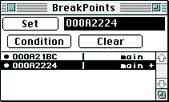
Figure 1: BreakPoints window
Table 1:  Working with the Breakpoints window.
------------------------------------------------------
To...           |Do this...
------------------------------------------------------
Open the window |Press Command-U, or select
                |BreakPoints from the View menu.
------------------------------------------------------
Set a breakpoint|Enter the breakpoint address or a
                |function name into the edit box to
                |the right of the Set button, then
                |click Set. The source line or
                |disassembly line is marked with a
                |bullet ().
------------------------------------------------------
Remove a        |Click on a breakpoint in the list to
breakpoint      |select it, then click Clear. The
                |bullet in the left margin of the
                |Source or Disassembly window is
                |replaced with a pound sign (#).
------------------------------------------------------
Set conditional |Click on the Condition box.See Using
breakpoints     |conditional breakpoints from the
                |Source window.
------------------------------------------------------
Note: You can place hard-coded breakpoints into the source code if you include debug.h in that file. Putting a Debugger(); statement anywhere in the code will then cause a breakpoint. Use Ignore Software Breakpoints in the Preferences dialog if you want to run your program without stopping at these breakpoints.