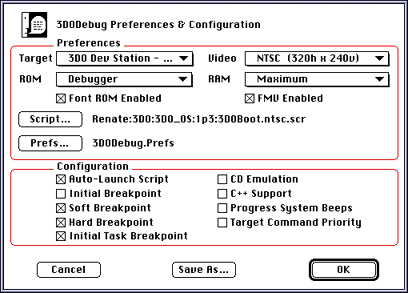
Figure 1: Preferences and Configuration dialog box.
Preferences dialog pop-ups
The following table lists all pop-up menus in the Preferences dialog and explains how to use them. Note that you can download a Flash ROM with the ROM option
Table 1:  Debugger Preferences pop-up menus.
--------------------------------------------------------
Item                 |Description
--------------------------------------------------------
Target               |Lets you choose among several 3DO
                     |Stations or between a 3DO Station
                     |and a 3DO Development Card,
                     |depending on what's hooked up to
                     |your Macintosh.
--------------------------------------------------------
ROM                  |Lets you change modes, download a
                     |new system ROM, or download a new
                     |Font ROM.
                     |* Debuggerenables Debugger mode
                     |* Flashenables the ROM currently
                     |in flash ROM (disabled for 3DO
                     |Developers' Card)
                     |* Download Systemprompts for a
                     |system ROM image to download
                     |(disabled for 3DO Developers'
                     |Card)
                     |* Download Fontprompts for a font
                     |ROM image to downloadIf you are
                     |running in stand-alone mode using
                     |one ROM file and then want to
                     |switch to using the other ROM
                     |file, you need to select Debugger
                     |mode in between.
--------------------------------------------------------
Video                |Lets you choose between NTSC and
                     |PAL using a pop-up menu.
--------------------------------------------------------
 RAM                 |Lets you set available memory (3DO
                     |Station only). You have the
                     |following choices:
                     |* Standard2 MB DRAM and 1 MB VRAM
                     |* Maximumall available memory
                     |(stock stations/cards have 2/2)
                     |* Minimum1/1 (probably never used)
                     |* Minimum-VRAMuses the maximum
                     |available memory for DRAM and 1 MB
                     |for VRAM
                     |* Minimum-DRAMuses the maximum
                     |available memory for VRAM and 1 MB
                     |for DRAM
--------------------------------------------------------
Font ROM enabled     |Enables the second flash ROM for
                     |use as a Kanji font ROM.
--------------------------------------------------------
FMV enabled          |Currently not implemented.
--------------------------------------------------------
Script               |Lets you select a script to
                     |execute and makes that script part
                     |of the Preferences.
--------------------------------------------------------
Prefs                |Lets you select a Preferences file
                     |and makes that file part of the
                     |Preferences.
--------------------------------------------------------
Preferences dialog Configuration checkboxes
The following table lists all check boxes available in the Preferences window:
Table 2:  Preferences dialog check boxes
--------------------------------------------------------
Check box            |Description
--------------------------------------------------------
Auto-Launch Script   |Automatically executes the script
                     |you ran last. To initially select
                     |a script, use the Script button in
                     |the Preferences dialog. If you
                     |don't, you will be prompted for a
                     |script to execute.
--------------------------------------------------------
Initial Breakpoint   |Sets a breakpoint before executing
                     |the operating system files.
--------------------------------------------------------
Soft Breakpoint      |Check this option to stop at
                     |breakpoints indicated by the
                     |Debugger() command.
--------------------------------------------------------
Hard Breakpoint      |Check this option to stop at
                     |breakpoints indicated by the
                     |Breakpoints() command.
--------------------------------------------------------
Initial Task         |Sets a breakpoint before main() of
Breakpoint           |the debugged task.
--------------------------------------------------------
CD Emulation         |Check this option when working
                     |with a cdrom.image file generated
                     |by the layout tool. The Debugger
                     |introduces delays to better
                     |simulate transfer rate.
--------------------------------------------------------
C++ Support          |Provides rudimentary C++ support
                     |by using name unmangling. Don't
                     |check this option unless you are
                     |using C++, symbol lookups are much
                     |slower.
--------------------------------------------------------
Progress System Beeps|By default, the Macintosh sounds
                     |an alarm each time a prompt is
                     |sent to the Terminal window. This
                     |checkbox turns off that sound.
--------------------------------------------------------
Target Command       |Used in conjunction with ARIA
Priority             |requests when the Debugger is in
                     |the background. This checkbox will
                     |be removed in the future.
--------------------------------------------------------