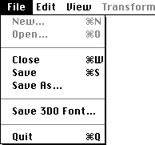
Figure 1: FontWriter File menu.
Table 1:  Fontwriter File menu commands.
--------------------------------------------------------
Command     |Description
--------------------------------------------------------
New         |Displays the Font Selection window.
--------------------------------------------------------
Open        |Brings up a Macintosh File Selection dialog
            |for opening a font previously created with
            |the 3DO FontWriter. Note: You can't open a
            |font saved as a 3DO font.
--------------------------------------------------------
Close       |Closes the current font-editing session and
            |prompts you to save changes.
--------------------------------------------------------
Save        |Saves a font in a 3DO FontWriterreadable
            |format. You cannot display this format on
            |the 3DO system.
--------------------------------------------------------
Save As     |Prompts for a new filename and saves the
            |font in a 3DO FontWriterreadable format.
            |You cannot display this format on the 3DO
            |system.
--------------------------------------------------------
Save 3DO    |Saves the font in a format you can display
Font        |on the 3DO system but cannot load back into
            |the 3DO FontWriter. The filename extension
            |is .3do.
--------------------------------------------------------
Quit        |Quits the application. If you've made
            |changes, you are prompted whether to save
            |them or not.
--------------------------------------------------------