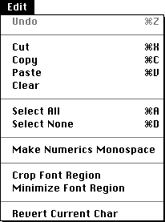
Figure 1: FontWriter Edit menu.
Commands in the Edit menu become available after you've made a selection in the Character Edit window with the Marquee tool. Then you can perform standard Macintosh copying, cutting, and pasting, and can undo the last change made.
Table 1 lists the options not commonly found in an Edit menu:
Table 1:  Fontwriter Edit menu commands.
------------------------------------------------------------
Command       |Description
------------------------------------------------------------
Make Numerics |Looks for the widest numeric character (0-9);
Monospace     |makes all numerics that width and centers them.

------------------------------------------------------------
Crop Font     |Resizes the entire font to the width
Region        |and height of the selected region.

------------------------------------------------------------
Minimize Font |Resizes the entire font to the minimum width
Region        |and height needed to store every character.

------------------------------------------------------------
Revert        |Current CharReverts to the original character
              |image by discarding any changes made to
              |that character.
------------------------------------------------------------