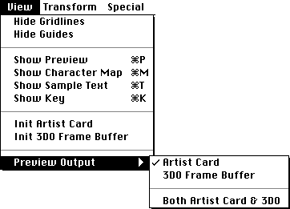
Figure 1: FontWriter View menu.
Table 1 lists the FontWriter View menu commands.
Table 1:  FontWriter View menu commands.
---------------------------------------------------------
Command           |Description
---------------------------------------------------------
Show/Hide         |Shows/hides gridlines the size of the
Gridlines         |individual font pixels.
---------------------------------------------------------
Show/Hide Guides  |Shows/hides the lines indicating font
                  |baseline and character width.
---------------------------------------------------------
Show/Hide Preview |Shows/hides the Preview window.
---------------------------------------------------------
Show/Hide Sample  |Shows/hides the Sample Text window.
Text              |
---------------------------------------------------------
Show/Hide         |Shows/hides a window that displays all
Character Map     |characters in the font. If you select
                  |a character in that map, it appears in
                  |the edit region of the Character Edit
                  |window.
---------------------------------------------------------
Show/Hide Key     |Shows/hides a window with information
                  |about font terminology.
---------------------------------------------------------
Init Artist Card  |Clears the TV monitor screen by
                  |initializing the Artist Card.
---------------------------------------------------------
Init 3DO Frame    |Clears the TV monitor screen by
Buffer            |clearing the frame buffer into which
                  |fonts are displayed on the 3DO
                  |Station.
---------------------------------------------------------
Preview Output    |Determines the output for the text in
                  |the sample text window when previewing
                  |on the TV screen. You can select the
                  |target (Artist Card or 3DO Station)
                  |from the submenu.
---------------------------------------------------------