```c
// Attribute 0
#define ATTR0_BUILD(y, shape, bpp, mode, mos, bld, win) \
( \
((y)&255) | (((mode)&3)<<8) | (((bld)&1)<<10) | (((win)&1)<<11) \
| (((mos)&1)<<12) | (((bpp)&8)<<10) | (((shape)&3)<<14) \
)
// Attribute 1, regular sprites
#define ATTR1_BUILD_R(x, size, hflip, vflip) \
( ((x)&511) | (((hflip)&1)<<12) | (((vflip)&1)<<13) | (((size)&3)<<14) )
// Attribute 1, affine sprites
#define ATTR1_BUILD_A(x, size, aff_id) \
( ((x)&511) | (((aff_id)&31)<<9) | (((size)&3)<<14) )
// Attribute 2
#define ATTR2_BUILD(id, pbank, prio) \
( ((id)&0x3FF) | (((pbank)&15)<<12) | (((prio)&3)<<10) )
```
Instead of doing ORring the bitflags together yourself, you can use these and perhaps save some typing. The order of arguments maybe annoying to remember for some, and the amount of safety checking may be a bit excessive (gee, ya think?!?), but if the numbers you give them are constants the operations are done at compile time so that's okay, and sometimes they really can be helpful. Or not :P. Like I said, I'm not forcing you to use them; if you think they're wretched pieces of code (and I admit they are) and don't want to taint your program with them, that's fine.
Note that with the exception of `bpp`, the arguments are all shifted by the macros, meaning that you should *not* use the `#define` flags from the lists, just small values like you'd use if they were separate variables rather than bits in a variable.
## Demo time {#sec-obj-demo}
Now, to actually use the bloody things. The code below is part of the *obj_demo*. It is the most complex I've shown yet, but if you take it one step at a time you'll be fine. Essentially, this demo places the tiles of a boxed metroid in the VRAM allotted for objects and then lets you screw around with various `OBJ_ATTR` bits like position and flipping flags. The controls are as follows:
- Control Pad
Moves the sprite. Note that if you move far enough off-screen, it'll come up on the other side.
- A and B Buttons
Flip the sprite horizontally or vertically, respectively.
- Select Button
Makes it glow. Well, makes it palette-swap, actually. Handy for damage-flashing.
- Start Button
Toggles between 1D and 2D mapping modes. {*@fig:obj-map}b and {@fig:obj-map}c should explain what happens. Since the sprite is in 1D mode, there's really not much to see when you switch to 2D mapping, but I had a few buttons to spare, so I thought why not.
- L and R Buttons
Decreases or increase the starting tile, respectively. Again, I had a few keys to spare.
```c
// Excerpt from toolbox.h
void oam_init(OBJ_ATTR *obj, uint count);
void oam_copy(OBJ_ATTR *dst, const OBJ_ATTR *src, uint count);
INLINE OBJ_ATTR *obj_set_attr(OBJ_ATTR *obj, u16 a0, u16 a1, u16 a2);
INLINE void obj_set_pos(OBJ_ATTR *obj, int x, int y);
INLINE void obj_hide(OBJ_ATTR *oatr);
INLINE void obj_unhide(OBJ_ATTR *obj, u16 mode);
// === INLINES ========================================================
//! Set the attributes of an object.
INLINE OBJ_ATTR *obj_set_attr(OBJ_ATTR *obj, u16 a0, u16 a1, u16 a2)
{
obj->attr0= a0; obj->attr1= a1; obj->attr2= a2;
return obj;
}
//! Set the position of \a obj
INLINE void obj_set_pos(OBJ_ATTR *obj, int x, int y)
{
BF_SET(obj->attr0, y, ATTR0_Y);
BF_SET(obj->attr1, x, ATTR1_X);
}
//! Hide an object.
INLINE void obj_hide(OBJ_ATTR *obj)
{ BF_SET2(obj->attr0, ATTR0_HIDE, ATTR0_MODE); }
//! Unhide an object.
INLINE void obj_unhide(OBJ_ATTR *obj, u16 mode)
{ BF_SET2(obj->attr0, mode, ATTR0_MODE); }
```
```c
// toolbox.c
void oam_init(OBJ_ATTR *obj, uint count)
{
u32 nn= count;
u32 *dst= (u32*)obj;
// Hide each object
while(nn--)
{
*dst++= ATTR0_HIDE;
*dst++= 0;
}
// init oam
oam_copy(oam_mem, obj, count);
}
void oam_copy(OBJ_ATTR *dst, const OBJ_ATTR *src, uint count)
{
// NOTE: while struct-copying is the Right Thing to do here,
// there's a strange bug in DKP that sometimes makes it not work
// If you see problems, just use the word-copy version.
#if 1
while(count--)
*dst++ = *src++;
#else
u32 *dstw= (u32*)dst, *srcw= (u32*)src;
while(count--)
{
*dstw++ = *srcw++;
*dstw++ = *srcw++;
}
#endif
}
```
This is the basic utility code for the demo, and contains most of the things you'd actually like to have functions for. Note that the inline functions make good use of the bitfield macros shown earlier; if I hadn't done that, the code would be a good deal longer.
Another point that I need to make is that if I'd put everything into *toolbox.h*, the file would be pretty big, around 700 lines or so. And with future demos, it'd be a lot longer. With that in mind, I've started redistributing the contents a little: all the types go in *types.h*, everything to do with the memory map goes into *memmap.h*, all the register defines go into *memdef.h* and the input inlines and macros can be found in *input.h*. The rest is still in *toolbox.h*, but will find themselves redistributed in the end as well.
The two functions in *toolbox.c* need some more clarification as well I guess. In `oam_init()` I cast the objects to a word pointer and use that for setting things; again, this is simply because it's a lot faster. Because it may be used to initialixe something other than the real OAM, I copy the initialized buffer to OAM just in case.
The other point concerns something of a very specific bug in the optimizer of the current compiler (devkitARM r19b). I expect this to be fixed in a later addition and the basic version here *should* work, but just in case it isn't, set the `#if` expression to 0 if you see OAM get corrupted. If you must know, the problem seems to be `struct` copying of OBJ_ATTRs in a `for` loop. Yes, it's that specific. Even though `struct` copying is legal and fast if they're word aligned, it seems GCC gets confused with 8-byte blocks in loops and uses `memcpy()` for each struct anyway, something that wouldn't work on OAM. Oh well.
```c
#include
#include "toolbox.h"
#include "metr.h"
OBJ_ATTR obj_buffer[128];
OBJ_AFFINE *obj_aff_buffer= (OBJ_AFFINE*)obj_buffer;
void obj_test()
{
int x= 96, y= 32;
u32 tid= 0, pb= 0; // (3) tile id, pal-bank
OBJ_ATTR *metr= &obj_buffer[0];
obj_set_attr(metr,
ATTR0_SQUARE, // Square, regular sprite
ATTR1_SIZE_64, // 64x64p,
ATTR2_PALBANK(pb) | tid); // palbank 0, tile 0
// (4) position sprite (redundant here; the _real_ position
// is set further down
obj_set_pos(metr, x, y);
while(1)
{
vid_vsync();
key_poll();
// (5) Do various interesting things
// move left/right
x += 2*key_tri_horz();
// move up/down
y += 2*key_tri_vert();
// increment/decrement starting tile with R/L
tid += bit_tribool(key_hit(-1), KI_R, KI_L);
// flip
if(key_hit(KEY_A)) // horizontally
metr->attr1 ^= ATTR1_HFLIP;
if(key_hit(KEY_B)) // vertically
metr->attr1 ^= ATTR1_VFLIP;
// make it glow (via palette swapping)
pb= key_is_down(KEY_SELECT) ? 1 : 0;
// toggle mapping mode
if(key_hit(KEY_START))
REG_DISPCNT ^= DCNT_OBJ_1D;
// Hey look, it's one of them build macros!
metr->attr2= ATTR2_BUILD(tid, pb, 0);
obj_set_pos(metr, x, y);
oam_copy(oam_mem, obj_buffer, 1); // (6) Update OAM (only one now)
}
}
int main()
{
// (1) Places the tiles of a 4bpp boxed metroid sprite
// into LOW obj memory (cbb == 4)
memcpy(&tile_mem[4][0], metr_boxTiles, metr_boxTilesLen);
memcpy(pal_obj_mem, metrPal, metrPalLen);
// (2) Initialize all sprites
oam_init(obj_buffer, 128);
REG_DISPCNT= DCNT_OBJ | DCNT_OBJ_1D;
obj_test();
while(1);
return 0;
}
```
### Setting up sprites {#ssec-demo-init}
Before any sprites show up, there are three things you have to do, although not necessarily in this order. They are: copying sprite graphics to VRAM, setting up OAM to use these graphics, and enabling sprites in the display control, `REG_DISPCNT`.
#### Display control
Starting with the last one, you enable sprites by setting bit 12 of `REG_DISPCNT`. Usually you'll also want to use 1D mapping, so set bit 6 as well. This is done at **point (2)** of the code.
#### Hiding all sprites
The other step performed here is a call to `oam_init()`. This isn't strictly necessary, but a good idea nonetheless. What `oam_init()` does is hide all the sprites. Why is this a good idea? Well, because a fully zeroed out OAM does *not* mean the sprites are invisible. If you check the attributes you'll see that this will mean that they're all 8×8-pixel sprites, using tile 0 for their graphics, located at (0,0). If the first tile isn't empty, you'll start with 128 versions of that tile in the top-left corner, which looks rather strange. So, make sure they're all invisible first. The demo also comes with `obj_hide()` and `obj_unhide()` functions, although they aren't used here.
#### Loading sprite graphics
The first thing to do (**point (1)**) is to store the sprite graphics in object VRAM. As I've already said a few times now, these graphics should be stored as 8×8-pixel tiles, not as a flat bitmap. For example, my sprite here is 64×64p in size, so to store it I've had to convert this to 8×8 separate tiles first. If you do *not* do this, your sprites will look very strange indeed.
Exactly where you put these tiles is actually not all that relevant (apart from the obvious, like mapping mode, and tile alignment, of course). Object VRAM works as a texture pool and has nothing to do with the screen directly. You store the tiles that you want to be available there, and it is by manipulating the OAM attributes that the system knows which tiles you want to use and where you want them. There is no reason why sprite 0 couldn't start at tile 42, or why multiple sprites couldn't use the same tiles. This is also why `OAMData`, which is sometimes used for object VRAM, is such a misnomer: object VRAM has nothing to do with OAM. *Nothing*! If your headers use this name for 0601:0000, or even 0601:4000, change it. Please. And be careful where you put things in the bitmap modes, as you can't use tiles 0-511 there.
As I said, loading the sprites happens at **point (1)** in the code. If you paid attention to the [overview](objbg.html#ssec-img-cbb), you'll remember that `tile_mem[][]` is a two dimensional array, mapping charblocks and 4-bit tiles. You'll also remember that object VRAM is charblocks 4 and 5, so `&tile_mem[4][0]` points to the first tile in object VRAM. So I'm loading my boxed metroid into the first 64 tiles of object VRAM.
I am also loading its palette into the sprite palette. That's *sprite* palette (0500:0200), not background palette. Load it to the wrong place and you won't see anything.
:::tip Finding tile addresses
Use `tile_mem` or a macro to find the addresses to copy your tiles too, it's much more readable and maintainable than calculating them manually. You should not have any hard-coded VRAM addresses in your code, ever.
:::
:::danger OAMData
Headers from other sites sometimes `#define OAMData` as part of VRAM. It is not. Rename it.
:::
#### Setting attributes
Lastly, I'll set up one `OBJ_ATTR` so that it actually uses the metroid tiles. This is done at **point (3)**, using the `obj_set_attr()` inline function. All it does is three assignments to the attributes of the first argument, by the way, nothing spectacular. This just saves typing doing it this way rather than three separate statements. With this particular call, I tell this sprite that it's a 64×64 pixel (8×8 tile) sprite, and its starting tile is `tid`, which is 0. This means that it'll use the 64 tiles, starting at tile 0.
Note that the sprite I'm setting is actually part of the OAM buffer, not the real OAM. This means that even after I set the attributes there, nothing happens yet. To finalize the sprite I need to update the *real* OAM, which is done by a call to `oam_copy()` (**point (6)**). This carries two arguments: an index and a count denoting how many sprites to update, and which sprite to start at. I also have `obj_copy()`, which only copies attributes 0, 1 and 2, but *not* 3! This is necessary when you start using affine sprites, which may be copied incorrectly otherwise.
The previous steps are enough to get the metroid sprite on-screen. The story doesn't end there, of course. Here are a few things that you can do with sprites.
### Sprite positioning {#ssec-demo-pos}
The first order of business is usually to place it at some position on screen, or even off screen. To do this you have to update the bits for the *y* and *x* positions in attributes 0 and 1, respectively. One mistake I often seem to make is fill *x* into attr0 and *y* into attr1, when it should be the other way around. If your sprite moves strangely, this might be why.
Note that these coordinates mark the **top-left** of the sprite. Also, the number of bits for the coordinates means we have 512 possible *x*-values and 256 *y*-values. The coordinate ranges wrap around, so you could also say that these are signed integers, with the ranges *x* ∈ \[-256, 255\] and *y* ∈ \[-128, 127\]. Yes, that would make the highest *y*-value smaller than the height of the screen, but thanks to the wrapping it all works out. Well, [almost](affobj.html#ssec-wrap). Anyway, thanks to the 2s-complement nature of integers, simply masking the *x* and *y* values by `0x01FF` and `0x00FF`, respectively, will give proper 9- and 8-bit signed values. You can do this manually, or use the `obj_set_pos()` function used at **point (4)**.
You might see code that clears the lower bits of the attributes and then directly ORRs in *x* and *y*. This is not a good idea, because negative values are actually represented by upper half of a datatype's range. −1 for example is all bits set (0xFFFFFFFF). Without masking off the higher bits, negative values would overwrite the rest of the attribute bits, which would be bad.
:::warning Mask your coordinates
If you're making a sprite positioning function or use someone else's **make sure** you mask off the bits in *x* and *y* before you insert them into the attributes. If not, negative values will overwrite the whole attribute.
This is bad
```c
obj->attr0= (obj->attr0 &~ 0x00FF) | (y);
```
This is good:
```c
obj->attr0= (obj->attr0 &~ 0x00FF) | (y & 0x00FF);
```
:::
#### Position variables and using tribools
Instead of using an `OBJ_ATTR` to store the sprite's position, it is better to keep them in separate variables, in this case `x` and `y`. This avoids having to mask coordinate fields all the time, but more importantly, the positions can extend beyond the size of the screen. As most game worlds aren't restricted to a single screen, this is an important point. Then, when the time is right, these are fed to `oam_set_pos()` to update the sprite.
Also, note the use of my [tribool key functions](keys.html#ssec-adv-tri) to update the positions. Input processing often follows a pattern of “key X pressed: increment, key opposite of Y pressed, decrement” The tribool functions bring that kind of code down from four lines to one, which makes the code easier to read (once you get over the initial hurdle). For example, `key_tri_horz()` returns +1 if ‘right’ is pressed, −1 if ‘left’ is pressed, and 0 if neither or both are pressed. `key_tri_vert()` does something similar for vertical movement and the line with `bit_tribool()` function makes a variant using `key_hit()` and R and L to increment or decrement the tile index.
### Other attrs {#ssec-demo-attr}
Sprite coordinates are only two of the many sprite attributes that can be controlled with via specific OAM bits, even while the sprite is already active. Some of the obvious ones are flipping or mirroring it, which can be done using A and B here. Or, if you're using a 4bpp sprite, you can swap palettes so that all the colors change. Pressing Select in the demo switches from palette bank 0 to 1, which happens to have a grey to white gradient. Toggling between these palette banks quickly can make the sprite flash. You could also change the priorities in which the sprites are rendered, or toggle alpha blending, although I haven't done those things here.
Now, these things don't really change the overall image of the sprite. What you should realize though is that it *is* possible to do that. As I've already noted before, it's not true that the contents of VRAM *are* the sprite, rather that a sprite *uses* parts of VRAM to show something, anything, on screen. You could, for example, change the starting tile `tid` that the sprite uses, which in this case can be done using L and R. Not only is this legal, it's the standard practice for animation (although you can also overwrite VRAM for that – resetting the tile index is just faster). Understanding this is one of the points of moving from a user to a developer perspective: the user only sees the surface; the coder looks below it and sees what's really going on.
And that's it for regular sprites. Using multiple sprites isn't much different – seen one, seen them all. Basic animation shouldn't be problematic either, until you run out of VRAM to put them in. There are still a few regions left untouched like blending and mosaic, but I'll deal with those [later](gfx.html).
 {*@fig:metr}. Metroid. Rawr.
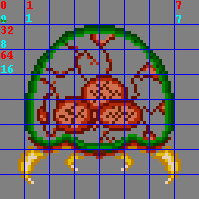 {*@fig:obj-map}a: zoomed out version of
{*@fig:metr}, divided into tiles; colored numbers
indicate mapping mode: red for 2D, cyan for 1D.
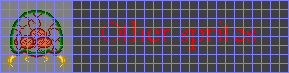 {*@fig:obj-map}b: how
{@fig:obj-map}a should be stored in memory when
using 2D mapping.
 {*@fig:obj-map}c: how
{@fig:obj-map}a should be stored in memory when using
1D mapping.