0; raw>>=1, ix++)
if(raw&1)
schr4c_plot(&tc->dst, x0+ix, y0+iy, ink);
}
srcD += srcP;
x0 += 8;
}
}
```
Now, you may think that this runs pretty slowly thanks to all the recalculations in `schr4c_plot()`. And you'd be right, but in truth, it's not as bad as I originally thought. It is possible to speed it up by simply inlining things, but the real gain comes from drawing pixels in parallel.
#### Version 2 : 8 pixels at once.
Instead of plotting pixel individually, you can also plot multiple pixels simultaneously. The `bmp8_drawg_b1cts()` renderer we saw earlier did this: it unpacked 2 pixels and drew together. In the case of 4bpp tiles, you can unpack the source byte into one (32bit) word and plot _eight_ pixels at once. The only downside is that you'll probably have to split it over two tiles.
The next function is TTE's main glyph renderer for tiles, and it is a doozy. There are two stages for the rendering in the inner loop: bit unpacking the source byte, `raw` and splitting the prepared pixel `px` into two adjacent tiles. These correspond to steps 3 and 4, respectively.
Normally, the bitunpack is done in a loop, but sometimes it's faster to do it in other ways. For details, see my document on [bit tricks](https://www.coranac.com/documents/bittrick/#sec-bup). The first five lines of step 3 do the unpacking. For example, it turns a binary `0001 1011` into a hexadecimal `0x00011011`. This is then multiplied by 15 and `ink` to give the pixel mask `pxmask` and the colored pixels `px`, respectively.
Step 4 distributes the word with the pixels over two tiles if necessary. In step 1, left and right shifts were prepared to supply the bit offsets for this procedure. Now, for larger glyphs this will mean that certain destination words are used twice, but this can't be helped (actually it can, but the procedure is ugly and possibly not worth it). An alternative to this is using the destination once and read (and unpack/color) the source twice; however, as VRAM is considerably faster than ROM I doubt this would be beneficial.
//! Render 1bpp fonts to 4bpp tiles; col-major order.
void chr4c_drawg_b1cts(uint gid)
{
    // Base variables.
    TTE_BASE_VARS(tc, font);
    TTE_CHAR_VARS(font, gid, u8, srcD, srcL, charW, charH);
    uint x= tc->cursorX, y= tc->cursorY, dstP= tc->dst.pitch/4;
    uint srcP= font->cellH;

    // (1) Prepare dst pointers and shifts.
    u32 *dstD= (u32*)(tc->dst.data + (y + x/8*dstP)*4), *dstL;
    x %= 8;
    uint lsl= 4*x, lsr= 32-4*x, right= x+charW;

    // Inner loop vars.
    u32 px, pxmask, raw;
    u32 ink= tc->cattr[TTE_INK];
    const u32 mask= 0x01010101;

    uint iy, iw;
    for(iw=0; iw<charW; iw += 8)    // Loop over strips
    {
        // (2) Update and increment main data pointers.
        srcL= srcD;     srcD += srcP;
        dstL= dstD;     dstD += dstP;

        for(iy=0; iy<charH; iy++)   // Loop over scanlines
        {
            raw= *srcL++;
            if(raw)
            {
                // (3) Unpack 8 bits into 8 nybbles and create the mask
                raw |= raw<<12;
                raw |= raw<<6;
                px   = raw & mask<<1;
                raw &= mask;
                px   = raw | px<<3;

                pxmask= px*15;
                px   *= ink;

                // (4a) Write left tile:
                dstL[0] = (dstL[0] &~ (pxmask<<lsl) ) | (px<<lsl);

                // (4b) Write right tile (if any)
                if(right > 8)
                    dstL[dstP]= (dstL[dstP] &~ (pxmask>>lsr) ) | (px>>lsr);
            }
            dstL++;
        }
    }
}
`chr4c_drawg_b1cts()` is pretty fast. It certainly is faster than the earlier version by about 33%. It's actually even faster than the bmp8 renderer, but only by a slim margin.
Of course, you can always go one better. The various shifts and conditionals make it perfect for ARM code, rather than Thumb. And to make sure it goes exactly according to plan, I'm doing this in assembly.
#### Version 3: ARM asm
The next function is `chr4_drawg_b1cts_fast()`, the ARM assembly equivalent of version 2. There's an almost one-to-one correspondence between the C and asm loops, so just loop to the C version for the explanation.
Speed-wise, the asm version is _much_ better than the C version. Even in ROM, which is _very_ bad for ARM code, it is still faster than the Thumb version. There are one or two tiny details by which you can speed this thing up, but by and large this should be it for fonts of arbitrary dimensions. Of course, if you have fixed sizes for your font and do not require recoloring or transparency, things will be a little different.
```armasm {#cd-chr4c-drawg-b1cts-fast .proglist}
// Include TTC/TFont member offsets plz.
#include "tte_types.s"
/*
IWRAM_CODE void chr4c_drawg_b1cts_fast(int gid);
*/
.section .iwram, "ax", %progbits
.arm
.align
.global chr4c_drawg_b1cts_fast
chr4c_drawg_b1cts_fast:
stmfd sp!, {r4-r11, lr}
ldr r5,=gp_tte_context
ldr r5, [r5]
@ Preload dstBase (r4), dstPitch (ip), yx (r6), font (r7)
ldmia r5, {r4, ip}
add r3, r5, #TTC_cursorX
ldmia r3, {r6, r7}
@ Get srcD (r1), width (r11), charH (r2)
ldmia r7, {r1, r3} @ Load data, widths
cmp r3, #0
ldrneb r11, [r3, r0] @ Var charW
ldreqb r11, [r7, #TF_charW] @ Fixed charW
ldrh r3, [r7, #TF_cellS]
mla r1, r3, r0, r1 @ srcL
ldrb r2, [r7, #TF_charH] @ charH
ldrb r10, [r7, #TF_cellH] @ cellH
@ Positional issues: dstD(r0), lsl(r8), lsr(r9), right(lr), cursorX
mov r3, r6, lsr #16 @ y
bic r6, r6, r3, lsl #16 @ x
add r0, r4, r3, lsl #2 @ dstD= dstBase + y*4
mov r3, r6, lsr #3
mla r0, ip, r3, r0
and r6, r6, #7 @ x%7
add lr, r11, r6 @ right= width + x%8
mov r8, r6, lsl #2 @ lsl = x%8*4
rsb r9, r8, #32 @ lsr = 32-x%8*4
ldr r6,=0x01010101
ldrh r7, [r5, #TTC_ink]
@ --- Reg-list for strip/render loop ---
@ r0 dstL
@ r1 srcL
@ r2 scanline looper
@ r3 raw
@ r4 px / tmp
@ r5 pxmask
@ r6 bitmask
@ r7 ink
@ r8 left shift
@ r9 right shift
@ r10 dstD
@ r11 charW
@ ip dstP
@ lr split indicator (right edge)
@ sp00 charH
@ sp04 deltaS = cellH-charH (delta srcL)
cmp r11, #8
@ Prep for single-strip render
suble sp, sp, #8
ble .Lyloop
@ Prep for multi-strip render
sub r3, r10, r2
mov r10, r0
stmfd sp!, {r2, r3} @ Store charH, deltaS
b .Lyloop
@ --- Strip loop ---
.Lsloop:
@ (2) Update and increment main data pointers.
ldmia sp, {r2, r3} @ Reload charH and deltaS
add r10, r10, ip @ (Re)set dstD/dstL
mov r0, r10
add r1, r1, r3
sub lr, lr, #8
@ --- Render loop ---
.Lyloop:
@ (3) Prep px and pxmask
ldrb r3, [r1], #1
orrs r3, r3, r3, lsl #12
beq .Lnopx @ Skip if no pixels
orr r3, r3, r3, lsl #6
and r4, r3, r6, lsl #1
and r3, r3, r6
orr r3, r3, r4, lsl #3
rsb r5, r3, r3, lsl #4
mul r4, r3, r7
@ (4a) Render to left tile
ldr r3, [r0]
bic r3, r3, r5, lsl r8
orr r3, r3, r4, lsl r8
str r3, [r0]
@ (4b) Render to right tile
cmp lr, #8
ldrgt r3, [r0, ip]
bicgt r3, r3, r5, lsr r9
orrgt r3, r3, r4, lsr r9
strgt r3, [r0, ip]
.Lnopx:
add r0, r0, #4
subs r2, r2, #1
bne .Lyloop
@ Test for strip loop
subs r11, r11, #8
bgt .Lsloop
add sp, sp, #8
ldmfd sp!, {r4-r11, lr}
bx lr
@ EOF
```
### Multi-color and shaded fonts. {#ssec-chr4-drawg-b4}
Bitpacked fonts will give you monochrome glyphs. If you want more colors – for shading or anti-aliasing – you'll need to use more bits. The code for this is nearly identical to the 1bpp bitpacked version; the most important differences being a different source datatype and an alternative method for finding the right mask. Oh, and you won't have to unpack the bits anymore, of course.
The following snippet shows how you can make a transparency mask out of a word of 4bit pixels. Essentially, you mask all the bits of a nybble together and mask out the other bits of that nybble. This gives 0 if the whole nybble was empty, or 1 is it wasn't. This can then again be multiplied by 15 to give the proper mask.
```c {.proglist}
// Create pixel mask from 8x 4 bits
u32 *srcL= ...; // Source is now 32bit.
raw = *srcL++; // Source word: 8x 4 bits
pxmask = raw;
pxmask |= pxmask>>2; // bit0 = bit0 | bit2
pxmask |= pxmask>>1; // bit0 = bit0 | bit1 | bit2 | bit3;
pxmask &= 0x11111111; // bit0 is 0 only if bits 0-3 were all 0
pxmask *= 15;
```
 {*@fig:img-verdana9-b4}
: Verdana 9, with shade.
#### Shaded characters
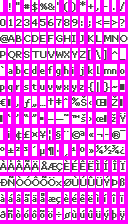
No, not shad*y* characters; shad*ed* characters. What you'll often see in games is that the text has either an outline or a bit of shading on one side. While it is possible to create shading with a 1bpp font, it's easier to simply build it into the font itself (see {@fig:img-verdana9-b4}). Because this means more colors than 1bpp can handle, you may be tempted to use a 2bpp font here. However, unless you are _really_ stressed for memory, it's more convenient to use 4bpp here as well.
At that point, you can follow the procedure described earlier. But by cleverly using the bits that make up the shading, you can allow the shadow color to be variable as well. For example, you can designate bit 0 as the 'ink' bit, bit 1 as the 'shadow' bit and if necessary bit 2 as the 'paper' bit. Then `raw&0x11111111` gives the 'ink' mask, and `(raw>>1)&0x11111111` gives the 'shadow' mask; these can then be used to apply colors and to create the full mask. The following is a demonstration of how this can be done. Note that each line here corresponds exactly to one ARM instruction, so this should be an efficient method. Well, in ARM code anyway.
```c {.proglist}
// Use bits 0 and 1 from each nybble to create masks and apply colors.
u32 *srcL= ...;
raw = *srcL++; // Source word: 8x 4 bits
px = raw & 0x11111111; // Bit 0 for ink pixels
raw = raw>>1 & 0x11111111; // Bit 1 for shadow pixels
pxmask = px | raw; // Mask of ink and shadow bits
pxmask *= 15;
px = px * ink; // Color with ink
px += raw* shadow; // Add shadow pixels
```
The `chr4c_drawg_b4cts()` renderer uses this method to color both the ink and shadow pixels. It's essentially `chr4c_drawg_b4cts()` except for the things in bold and the removal of the bit unpacking. Also note the ‘no-pixel’ condition here. If `pxmask` is zero, there's nothing to do; and so we won't.
//! 4bpp font, tilestrips with ink/shadow coloring.
void chr4c_drawg_b4cts(uint gid)
{
    TTE_BASE_VARS(tc, font);
    TTE_CHAR_VARS(font, gid, u32, srcD, srcL, charW, charH);
    uint x= tc->cursorX, y= tc->cursorY;
    uint srcP= font->cellH, dstP= tc->dst.pitch/4;

    // (1) Prepare dst pointers and shifts.
    u32 *dstD= (u32*)(tc->dst.data + (y+x/8*dstP)*4), *dstL;
    x %= 8;
    uint lsl= 4*x, lsr= 32-4*x, right= x+charW;

    // Inner loop vars
    u32 amask= 0x11111111;
    u32 px, pxmask, raw;
    u32 ink=   tc->cattr[TTE_INK];
    u32 shade= tc->cattr[TTE_SHADOW];

    uint iy, iw;
    for(iw=0; iw<charW; iw += 8)    // Loop over strips
    {
        srcL= srcD;     srcD += srcP;
        dstL= dstD;     dstD += dstP;

        for(iy=0; iy<charH; iy++)   // Loop over scanlines
        {
            raw= *srcL++;

            // (3a) Prepare pixel mask
            px    = (raw    & amask);
            raw   = (raw>>1 & amask);
            pxmask= px | raw;
            if(pxmask)
            {
                px *= ink;          // (3b) Color ink pixels
                px += raw*shade;    // (3c) Color shadow pixels
                pxmask *= 15;       // (3d) Create mask

                // (4a) Write left tile:
                dstL[0] = (dstL[0] &~ (pxmask<<lsl) ) | (px<<lsl);

                // (4b) Write right tile (if any)
                if(right > 8)
                    dstL[dstP]= (dstL[dstP] &~ (pxmask>>lsr) ) | (px>>lsr);
            }
            dstL++;
        }
    }
}
### Tips for fast tile rendering {#ssec-chr4-tips}
I've done a fair bit of profiling for these tile renderers and think I have a decent knowledge of which techniques will be efficient and which won't. These are some of my observations.
- **Profile**. Before conjuring up tricky routines, make sure the original simple version warrants optimizing _and_ that the clever routine is actually faster.
- **Render transparently**. Now, you'd think that this would be slower, but it may not be. The thing about transparent text is that there are much less foreground pixels then there are background pixels, so the number of pixels to render is lower as well.
- **Don't buffer**. My first trials had separate stages for unpacking/coloring and inserting into VRAM. It put the prepared pixels into an IWRAM buffer, then copied that to VRAM. If I recall correctly, combining the loops and tossing the buffer saved me 30%.
- **Parallelize**. The road to getting the right data is long. It helps if you don't have to travel it that much. That said, if you have many empty pixels, drawing 8 of them at once may be a waste of effort. This will depend on the font.
- **ARM code is teh r0xx0rz**. There are lots of shifts, masks and quantities in these routines. This makes them particularly apt for ARM code instead of Thumb. In fact, even in ROM with its 16-bit bus, the ARM versions beat out the Thumb-compiled ones. Having said that …
- **Do not let GCC use constant masks in ARM**. There is an unfortunate bug in the ARM optimizer concerning ANDing literals (like 0x11111111). Instead of emitting a simple `ldr`+`and` pair, it will get clever and avoid the load by splitting the mask out over multiple byte-size masks. So instead of one instruction in the inner-loop, you now have four. Perhaps even more, depending on how many extra registers this takes. Note, this _only_ happens for constants and only for ARM-compiled code. A work-around is to have the mask in a global variable to be loaded before the loops. This is in part why I've hand-assembled some of the routines.
- **Code for special case if you can**. If you only have one font and don't require things like coloring, you can code for that case only and potentially save much time. Using constants for source and destination dimensions instead of using the ones in memory will also help a little.
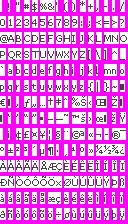
- **Use column-major accessing**. The routines presented above require extra code to move from one tile-row to another. If you use the tiles in a column-major layout, you won't have to do this.
Please apply the standard disclaimer to this list. I've found these techniques to work for my cases, but they won't apply to every case. For example, other systems (\*cough\* NDS) will have different CPU architectures and memory characteristics, and that would affect the speed.
### Colored text on a dialog window. {#ssec-chr4-demo}
 {*@fig:img-test-chr4}
: Text on tiles.
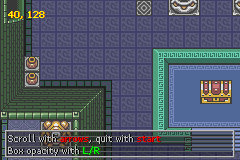
The situation depicted in {@fig:img-test-chr4} should be familiar. The key point here is that there is a background map, and a dialog box with text in it. This text is static, but the position in the top-left corner is continually updated as you scroll along the map.
The core function for this demo is `test_tte_chr4()`. The first thing it does is call `tte_init_chr4c()` to initialize the text system for chr4c-mode. The third argument is the offset for map-entries: `0xF000` meaning it uses sub-palette 15. The fourth is a word for the color attributes: 13 for the ink, 15 for the shadow and 0 for the others. For this demonstration, I'm using the 4bpp version of verdana9 (see {@fig:img-verdana9-b4}) and the fast assembly version to render the glyphs.
Step 2 loads the background map and the dialog box. Note that the dialog box is copied to the tiles that the text is rendered to. When the text is printed, this will show that the glyphs indeed are rendered transparently. This does more or less mean that I can't use the standard eraser, because that'd wipe the box as well.
The dialog text is drawn in step 3. The `ci` and `cs` tags set the ink and shadow color attributes, respectively. This makes the string “arrows” use colors 1 and 2 (well, 0xF1 and 0xF2), and so forth.
//! Set up a rectangle for text, with the non-text layers darkened for contrast.
void win_textbox(uint bgnr, int left, int top, int right, int bottom, uint bldy)
{
    REG_WIN0H= left<<8 | right;
    REG_WIN0V=  top<<8 | bottom;
    REG_WIN0CNT= WIN_ALL | WIN_BLD;
    REG_WINOUTCNT= WIN_ALL;

    REG_BLDCNT= (BLD_ALL&~BIT(bgnr)) | BLD_BLACK;
    REG_BLDY= bldy;

    REG_DISPCNT |= DCNT_WIN0;

    tte_set_margins(left, top, right, bottom);
}

//! Test chr4 shaded text renderer
void test_tte_chr4()
{
    irq_init(NULL);
    irq_add(II_VBLANK, NULL);
    REG_DISPCNT= DCNT_MODE0 | DCNT_BG0 | DCNT_BG2;

    // (1) Init for text
    tte_init_chr4c(
        0,                              // BG number.
        BG_CBB(0)|BG_SBB(10),           // BG control.
        0xF000,                         // Screen-entry base
        bytes2word(13,15,0,0),          // Color attributes.
        CLR_BLACK,                      // Ink color
        &verdana9_b4Font,               // Verdana 9, with shade.
        (fnDrawg)chr4c_drawg_b4cts_fast);    // b4cts renderer, asm version
    tte_init_con();                     // Initialize console I/O

    // (2) Load graphics
    LZ77UnCompVram(dungeon01Map, se_mem[12]);
    LZ77UnCompVram(dungeon01Tiles, tile_mem[2]);
    LZ77UnCompVram(dungeon01Pal, pal_bg_mem);

    GRIT_CPY(&tile_mem[0][16*30], dlgboxTiles);
    GRIT_CPY(pal_bg_bank[15], dlgboxPal);

    // (3) Create and print to a text box.
    win_textbox(0, 8, 160-32+4, 232, 160-4, 8);
    CSTR text=
        "#{P}Scroll with #{ci:1;cs:2}arrows#{ci:13;cs:15}, "
        "quit with #{ci:1;cs:2}start#{ci:13;cs:15}\n"
        "Box opacity with #{ci:3;cs:4}L/R#{ci:7;cs:9}";
    tte_write(text);

    // Reset margins for coord-printing
    tte_set_margins(8, 8, 232, 20);

    int x=128, y= 32, ey=8<<3;

    REG_BG2HOFS= x;
    REG_BG2VOFS= y;

    // Invisible map buildup!
    REG_BG2CNT= BG_CBB(2) | BG_SBB(12) | BG_REG_64x64;
    REG_DISPCNT= DCNT_MODE0 | DCNT_BG0 | DCNT_BG2 | DCNT_WIN0;

    while(1)
    {
        VBlankIntrWait();
        key_poll();

        // (4) Scroll and blend
        x = clamp(x + key_tri_horz(), 0, 512+1-SCREEN_WIDTH);
        y = clamp(y + key_tri_vert(), 0, 512+1-SCREEN_HEIGHT);
        ey= clamp(ey+ key_tri_shoulder(), 0, 0x81);

        REG_BG2HOFS= x;
        REG_BG2VOFS= y;
        REG_BLDY= ey>>3;

        // (5) Erase and print new position.
        tte_printf("#{es;P}%d, %d", x, y);

        if(key_hit(KEY_START))
            break;
    }
}
I'll close off this section with a word on the text box. If you look carefully, you'll see that it's semi-transparent. Or, to be precise, the text and the box itself are at normal intensity, but the background that it covers is darker than usual. Two things are necessary for this nice, little effect.
- An inside and outside window must be defined. Both windows should contain all layers, but the inner window must be set to use blending (WIN_BLD). This enables blending for the inside only.
- The blending mode should be set to fade-to-black (BLD_BLACK) for all layers except the background with the text box.
This is what `win_textbox()` is for. The function also sets the margins so that the text would wrap nicely inside the box.
## Scripting, console IO and other niceties {#sec-misc}
### TTE formatting commands {#ssec-misc-tags}
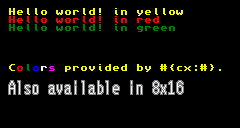
The TTE context contains members that control positioning, colors, fonts as well as a few other things. There are two approaches to changing these parameters. The first is to hard code changes in the state through direct member access or functions like `tte_set_ink()`. This works nice and fast, but isn't very flexible. The second is to use formatting tags in the strings themselves – the system parses the string for these tags and interprets them accordingly. This is basically a form of scripting.
The tags that TTE uses look like this:
```
#{`_`tag0`_`:`_`args`_`; `_`tag1`_`:`_`args`_`}
```
The code itself is starts with \``#{`' and ends with \``}`'. Each command consists of a tag, followed by a colon and comma-separated arguments when appropriate. Multiple commands can be separated by a semi-colon. For example, \``#{es; P:10,16}`' would clear the screen and set the cursor to (10, 16).
Now, I could show you how to parse this, but the parser currently in use for this is, well, let's just say it's long and very ugly. Essentially, it's a massive switch-block (sometimes a _double_ switch-block) with stuff like this:
char *tte_cmd_default(const char *str)
{
    int ch, val;
    char *curr= (char*)str, *next;

    TTC *tc= tte_get_context();

    while(1)
    {
        ch= *curr;
        next= curr+1;

        // (1) Check first character
        switch(ch)
        {
        // (2) --- Absolute Positions ---
        case 'X':
            tc->cursorX= curr[1]==':'           // If there's an argument ...
                ? strtol(curr+2, &next, 0)     // set cursor X to arg
                : tc->marginLeft;               // else move to start of line.
            break;

        // ... more cases ...

        // (3) Find EOS/EOC/token and act on it
        curr= tte_cmd_next(next);

        if(curr[0] == '\0')
            return curr;
        else if(curr[0] == '}')
            return curr+1;
    }
}
Like I said, ugly; but it'll have to do for now. The incoming pointer points to the first character past the '`#{`'. The command tags are all single or double-lettered; the switch looks for a recognized letter and acts accordingly.
One of the tags is '`X`', which sets the absolute X-coordinate of the cursor. The `tc->cursorX` will be set to the argument if it is present, or to the left margin if it is not. Note the use of [`strtol()`](https://en.cppreference.com/w/c/string/byte/strtol) here. This is a very interesting function. Not only does it work for both decimal and hex strings, but through the second argument you can retrieve a pointer to right after the number in the string. Alternatives would be `sscanf()` or `atoi()`, but `strtol()` is nicer.
After handling a tag, it'll look for more tags, or exit if the end delimiter or end of string is found.
{\*@tbl:tte-cmd} shows the available tags. Note that they are case-sensitive and some items can do more than one thing, depending on the number of parameters.
{*@tbl:tte-cmd}: Available TTE formatting tags.
| Code |
Description |
| P |
Reset position to top-left margin. |
| Pr |
Restore cursor position (see also Ps). |
| Ps |
Save cursor position. |
| P: x,y |
Set cursor to coordinates (x, y). |
| X |
Reset cursorX to left margin. |
| X: x |
Set cursorX to x. |
| Y |
Reset cursorY to top margin. |
| Y: y |
Set cursorY to y. |
| c[ispx]: cattr |
Set ink (ci), shadow (cs), paper (cp) or special (cx) color attribute to cattr.
|
| e[slbf] |
Erase the screen between margins (es), the current line (el), the current line up to the cursor (eb; backwards), the current line from the cursor (ef; forwards).
|
| er: l,t,r,b |
Erase a rectangle given by (l,t) to (r,b). |
| f: idx |
Set font to TTC.fontTable[idx]. |
| m[ltrb]: value |
Set left (ml), top (mt),right (mr) or bottom (mb) margin to value.
|
| m: l,t,r,b |
Set margins to rectangle (l,t) - (r,b) |
| p: dx, dy |
Move the cursor by (dx, dy). |
| s: idx |
Print the idx'th string in TTC.stringTable. |
| w: count |
Wait for count frames. |
| x: dx |
Move the cursor to the right by dx. |
| y: dy |
Move the cursor down by dy. |
I should point out that at present the commands are still fragile, so be careful with this stuff. For example, the positioning commands will simply move the cursor, but not clip to the margins. Also take care with the font and string commands (`f` and `s`, respectively). `tte_cmd_default()` doesn't test whether the index is out of the bounds of the arrays, so you could end up with … odd things. At some point, I hope to fix these things, but it's not a priority right now. If anyone has something more robust that I can use, please speak up.
:::warning TTE formatting commands : caveat emptor.
The current commands in TTE aren't exactly idiot-proof yet. If you stick to sensible things, it should work quite nicely. But it is still easy to shoot yourself in the foot if you're not careful.
:::
### Using console I/O {#ssec-misc-conio}
Something like `tte_write()` is nice for pure strings, but what would really help is if you had something like `printf()`. In the old days (pre-2006), `printf()`, `putc` and other console output functions were unavailable, but Wintermute added a mechanism to devkitArm's standard C library that allows it on consoles as well.
The key to this is the `devoptab_t` struct, defined in `sys/iosupport.h`. This contains a table of function pointers to device operations. The pointer we're interested in here is `write_r`; this is the function that `printf()` et al. call for the final output.
```c {.proglist}
// Partial devoptab_t definition
typedef struct {
const char *name;
int structSize;
int (*open_r)(struct _reent *r, void *fileStruct, const char *path,
int flags,int mode);
int (*close_r)(struct _reent *r,int fd);
int (*write_r)(struct _reent *r,int fd,const char *ptr,int len);
...
} devoptab_t;
```
The key to making the standard console routines work on a GBA is to redirect the default `write_r` for console output to one of our own making. Before explaining how this works, I want you to understand that this comes very close to black magic. It involves descending to the roots of the library and there is next to no documentation about how this stuff works. This story is the closest thing I could find to a full description: [Embedding GNU: Newlib, Part 2](https://web.archive.org/web/20100209210107/https://www.embedded.com/story/OEG20020103S0073), but this isn't high on explanations either.
To put it in other way: you're in a cave; it's pitch black and there are [grues]() about.
Now that that's done, let's continue. The first step is creating our replacement writer. In TTE's case, this is `tte_con_write()`. It is almost identical to `tte_write()`, but has to fit in the format given by `devoptab_t.write_r`. It comes down to this:
//! internal output routine used by printf.
/*! \param r    Reentrancy parameter.
    \param fd   File handle (?).
    \param text Text buffer containing the string prepared by printf.
    \param len  Length of string.
    \return     Number of output bytes (?)
    \note       \a text is NOT zero-terminated!!!!one!
*/
int tte_con_write(struct _reent *r, int fd, const char *text, int len)
{
    // (1) Safety checks
    if(!sConInitialized || !text || len<=0)
        return -1;

    int ch, gid, charW;
    const char *str= text, *end= text+len;

    // (2) check for end of text
    while( (ch= *str) != 0 && str < end)
    {
        str++;
        switch(ch)
        {

        // (3) --- VT100 sequence ( ESC[foo; ) ---
        case 0x1B:
            if(str[0] == '[')
                str += tte_cmd_vt100(str);
            break;

        //# (4) Other character cases. See tte_write()
        }
    }

    return str - text;
}
While I've added documentation for the arguments here, it's mostly based on guesswork. The `r` parameter contains [re-entrancy](https://en.wikipedia.org/wiki/Reentrancy_(computing)) information, useful if you have multiple threads. Since the GBA is a single-thread system, this should not concern us. I believe `fd` is a file handle of some sort, but since we're not writing to files this again does not concern us.
The real arguments of interest are `text` and `len`. The `text` argument points to the buffer with the string to render. In the case of `printf()`, it's the string _after_ formatting: all codes like `%d` are already done. And now for the most important part: `text` is **not** null-terminated. This is why there's a length variable as well.
As far as I can tell, `printf` uses a large buffer (approximately 1300 bytes) on the stack to which it writes the formatted numbers. This buffer isn't cleared you call it again, or terminated by ‘\\0’ when sent to the writer. This has the following consequences:
- 1300 bytes is a fair bit of IWRAM. Make sure you have enough room for it. Do _not_ call `printf()` from interrupts, as the routine is slow and the things can start to nest and clobber everything.
- Don't forget the `len` parameter. As the buffer isn't zeroed, remnants of old data may still be there, and you get crap.
- There's an additional potential danger with respect to parsing of formatting commands here. When strings exceed the buffer length, I imagine that it's broken up into smaller chunks. I don't know what will happen if the break occurs in the middle of a command, but I doubt it's good. Of course, you shouldn't have strings that long anyway, as the screen isn't big enough to fit them.
Aside from that, `tte_con_write()` is straightforward. As said, the contents of the loop are nearly identical to the one in `tte_write()`. The only real difference is point 3. This is a test for VT100 formatting strings, which will be covered in the next subsection.
To make use of the new writer, you have to hook it into the device list somehow. First, create a `devoptab_t` instance which the writer in the right place. There is a list of device operations called `devoptab_list`. The devices of interest are the streams `stdout` and `stderr`, which are entries `STD_OUT` and `STD_ERR` in the list. Simply point these entries to your own struct.
A second item is to set the buffers for these streams. I'm not sure this is really necessary, but that's how it's done in libgba and its author knows this system best so I'm not going to argue here. The function for this is `setvbuf()`. You find the required initialization steps below.
```c {#cd-tte-init-con .proglist}
static int sConInitialized= 0;
const devoptab_t tte_dotab_stdout=
{
"ttecon",
0,
NULL,
NULL,
tte_con_write,
NULL,
NULL,
NULL
};
//! Init stdio capabilities for TTE.
void tte_init_con()
{
// attach our operations to stdout and stderr.
devoptab_list[STD_OUT] = &tte_dotab_stdout;
devoptab_list[STD_ERR] = &tte_dotab_stdout;
// Set buffers.
setvbuf(stderr, NULL , _IONBF, 0);
setvbuf(stdout, NULL , _IONBF, 0);
sConInitialized = 1;
}
```
Calling `tte_init_con()` activates stdio's functionality so you can use `printf()` and such. Note that the raw `printf()` is rather heavy and it also has floating point options, which are rarely used in a GBA environment, if ever. For that reason, you'll usually use its integer-only cousin, `iprintf()`. Also note that TTE's implementation is **different** from libgba's, and the two should not be confused. For that reason, I've hidden the `iprintf()` name behind a `tte_printf` macro.
The following is a short example of its use. I'm using `tte_printf()` here, but `printf()` or `iprintf()` would have worked just as well.
```c {#cd-hello .proglist}
#include
#include
int main()
{
REG_DISPCNT= DCNT_MODE0 | DCNT_BG0;
// Init BG 0 for text on screen entries.
tte_init_se_default(0, BG_CBB(0)|BG_SBB(31));
// Enable TTE's console functionality
tte_init_con();
tte_printf("#{P:72,64}"); // Goto (72, 64).
tte_printf("Hello World!"); // Print "Hello world!"
while(1);
return 0;
}
```
:::warning Printf bagage
As wonderful as `printf()` is, there are some downsides to it too. First, it's a very heavy function that calls quite a large amount of functions which all have to be linked in. Second, it is pretty damn slow. Because it can do so much, it has to check for all these different cases. Also, for the string to decimal conversion it uses divisions, which is really bad for the GBA.
Be aware of how much `printf()` costs. If it turns out to be a bottle-neck, try making your own slimmed down version. A decent `sprintf()` alternative is `posprintf()`, created by [Dan Posluns](https://www.danposluns.com/gbadev/).
:::
### VT100 escape sequences {#ssec-misc-vt100}
Every book on C will tell you that you can place text on a console screen. What they usually don't tell you is that, in some environments, you can control formatting as well. One such environment is the [VT100](https://en.wikipedia.org/wiki/VT100), which used escape sequences to indicate formatting. The libraries that devkitPro distributes for various systems use these sequences, so it's a good idea to support them as well.
The general format for the codes is this:
```
CSI n1;n2 ... letter
```
_CSI_ here is the ASCII code for the command sequence indicator, which in this case is the escape character (27, 0x1B or 033) followed by '\['. The letter at the end denotes the kind of formatting code, and _n1_, _n2_ … are the formatting parameters. Wikipedia has a nice overview of the standard set [here](https://en.wikipedia.org/wiki/ANSI_escape_code) and there's another one here: [VT100 commands and control sequences](https://web.archive.org/web/20080813073220/http://local.wasp.uwa.edu.au/~pbourke/dataformats/vt100/). Note that not all of the codes are supported in the devkitPro libraries. The ones you'll encounter most are the following:
{*@tbl:vt100}: Common VT100 sequences
| ESC[dyA |
Move cursor up dy rows. |
| ESC[dyB |
Move cursor down dy rows. |
| ESC[dxC |
Move cursor right dx columns. |
| ESC[dxD |
Move cursor left dx columns. |
| ESC[y;xH |
Set cursor to column x, row y. |
| ESC[2J |
Erase screen. |
| ESC[nK |
- Erase to end of line.
- Erase to start of line.
- Erase whole line.
|
| ESC[y;xf |
As ESC[y;xH |
| ESC[s |
Save cursor position. |
| ESC[u |
Restore cursor position. |
If you compare this list to {@tbl:tte-cmd}, you'll see that most of these codes have corresponding TTE commands. You can use either, but if you plan to make something that's supposed to be cross-platform, use the VT100 codes.
:::warning Deviations from the standard
I'm trying to keep my implementation as close to the standard as possible. This is mainly because TTE uses other things just 8x8 characters on a regular background. In particular, scrolling is absent here and there are no color codes. Yet.
:::
### UTF-8 {#ssec-misc-utf}
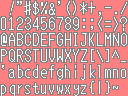
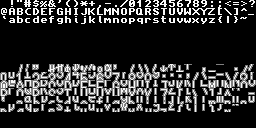
You may have heard of a little thing called [ASCII](https://en.wikipedia.org/wiki/ASCII). This is (or was; I'm not sure) the standard encoding for character strings. Each character is 1 byte long, giving 256 numbers for letters, numbers et cetera. {\*@fig:img-verdana9} and {@fig:img-verdana9-b4} contain character 32 to 255, as they usually appear on Windows. ASCII works fine for Western languages but are completely inadequate for languages like Japanese, which have thousands of characters. To remedy this, they came up with Unicode, which has 16 bits per character.
An intermediate between this is [UTF-8](https://en.wikipedia.org/wiki/UTF-8). This still uses 8-bit characters for the lower 128 ASCII codes, but bytes over 0x80 denote the start of a multi-byte code, where it and a few of the following characters form a single, larger character of up to 21 bits.
UTF-8 is a nice way of having your cake and eating it too: you can still use normal characters for Latin characters, meaning it'll still work with ASCII programs, but you also have a method of representing bigger numbers.
{*@tbl:utf8}. UTF-8 to u32 conversion table.
| String (binary) |
Number (binary) |
Range (hex) |
| 0zzzzzzz |
0zzzzzzz |
0x000000 - 0x00007F (7 bit) |
| 110yyyyy 10zzzzzz |
00000yyy yyzzzzzz |
0x000080 - 0x0007FF (11 bit) |
| 1110xxxx 10yyyyyy 10zzzzzz |
xxxxyyyy yyzzzzzz |
0x000800 - 0x00FFFF (16 bit) |
| 11110www 10xxxxxx 10yyyyyy 10zzzzzz |
000wwwxx xxxxyyyy yyzzzzzz |
0x010000 - 0x10FFFF (21 bit) |
{\*@tbl:utf8} shows the conversion works. If a byte is lower than 128, it's a simple ASCII character. If it's higher, it can fall into three classes of multi-byte numbers. The range of the byte determines the number of bytes for the whole thing; once you know that, you need to grab the appropriate bit-patterns from these bytes and join them into a single number as the table indicates. For more details, I will refer you to the wikipedia page.
Below you can find a routine that reads and decodes a single utf-8 character from a string. Yes, it's a cluster-f\*\*k of conditions, but that's necessary to check whether all the characters really follow the format; and if it doesn't, it'll interpret the first byte of the range as an extended ASCII character. If you want, you can omit all the \``if((*src>>6)!=2) break;`' statements.
```c {#cd-utf8-decode .proglist}
//! Retrieve a single multibyte utf8 character.
uint utf8_decode_char(const char *ptr, char **endptr)
{
uchar *src= (uchar*)ptr;
uint ch8, ch32;
// Poor man's try-catch.
do
{
ch8= *src;
if(ch8 < 0x80) // 7bit
{
ch32= ch8;
}
else if(0xC0<=ch8 && ch8<0xE0) // 11bit
{
ch32 = (*src++&0x1F)<< 6; if((*src>>6)!=2) break;
ch32 |= (*src++&0x3F)<< 0;
}
else if(0xE0<=ch8 && ch8<0xF0) // 16bit
{
ch32 = (*src++&0x0F)<<12; if((*src>>6)!=2) break;
ch32 |= (*src++&0x3F)<< 6; if((*src>>6)!=2) break;
ch32 |= (*src++&0x3F)<< 0;
}
else if(0xF0<=ch8 && ch8<0xF8) // 21bit
{
ch32 = (*src++&0x0F)<<18; if((*src>>6)!=2) break;
ch32 |= (*src++&0x3F)<<12; if((*src>>6)!=2) break;
ch32 |= (*src++&0x3F)<< 6; if((*src>>6)!=2) break;
ch32 |= (*src++&0x3F)<< 0;
}
else
break;
// Proper UTF8 char: set endptr and return
if(endptr)
*endptr= (char*)src;
return ch32;
} while(0);
// Not really UTF: interpret as single byte.
src= (uchar*)ptr;
ch32= *src++;
if(endptr)
*endptr= (char*)src;
return ch32;
}
```
Both `tte_write()` and `tte_write_con()` use `utf_decode_char()` when the string requires it. The larger characters can be used to access larger font sheets. You could use the larger sheets for better language support, or perhaps to extend the standard set of characters with arrows, and other types of symbols.
There is, however, one catch to using UTF-8 with stdio. Internally, stdio is really picky about what's acceptable. For example, the copywrite symbol, © is extended number 0xA9. In non-UTF-8, you could use just 0xA9 in a string and it'd use the right symbol. However, 0xA9 alone wouldn't fit any of the formats from {\*@tbl:utf8}, so it's an invalid code in UTF-8. While `utf8_decode_char()` is forgiving in this case, stdio isn't, an will interpret it as a terminator. In other words, be careful with extended ASCII character; you _have_ to use the proper UTF-8 formats if you want to use the stdio functions.
:::warning Printf, UTF-8, and extended ASCII
As of devkitArm r22, `printf()` and the other stdio functions use the UTF-8 locale. This effectively means that you cannot use characters like ‘©’ and ‘è’ directly like you used to in older versions. You need to use the full multi-byte UTF-8 notations.
:::
### Profiling the renderers {#ssec-misc-profile}
It's always a good idea to see how fast the things you make are. This is particularly true when the functions are complex, like most of the bitmap and tile renderers are.
{\*@tbl:tte-profile} lists the cycles per glyph for the majority of the available renderers. These have been measured with the string (and library code) in ROM with the default waitstates, under -O2 optimization. The font used was verdana 9, with has a cell size of 8x16, meaning it can be used for both fixed and variable widths with ease. The test string was a 194 character line from [Portal]():
> “Please note that we have added a consequence for failure. Any contact with the chamber floor will result in an 'unsatisfactory' mark on your official testing record followed by death. Good luck!”
{*@tbl:tte-profile}: Renderer times. Conditions: 194 chars, verdana 9, ROM code, default waits, -O2.
| Renderer |
Cycles/char |
| null |
221 |
| se_drawg |
595 |
| se_drawg_w8h16 |
370 |
| ase_drawg_w8h16 |
458 |
| chr4_drawg_b1cts_base |
3049 |
| chr4_drawg_b1cts |
2044 |
| chr4_drawg_b1cts_fast |
631 |
| bmp8_drawg_b1cts_base |
2875 |
| bmp8_drawg_b1cts |
2078 |
| bmp8_drawg_b1cts_fast |
619 |
| bmp16_drawg_b1cts_base |
2456 |
| bmp16_drawg_b1cts |
1503 |
| obj_drawg |
423 |
First, note the great differences in values: from hundreds for the tilemaps and objects to _thousands_ in the case of bitmaps and tile renderers. And this is per character, so writing large swats of text can lead to significant slowdown.
The `null()` renderer is a dummy renderer, used to find the overhead of the TTE system. 200 isn't actually that bad, all things considered (remember: ROM code). That said, now compare this number to the regular tilemap time: the overhead is takes up a significant fraction of the time here. Also note the difference between the standard and 8×16 versions of `se_drawg`: this is purely due the loops
Half of the TTE overhead actually comes from the wrapping code; cursor setting and checking can be relatively slow. And I'm not even considering clipping here.
For the bitmap and tile renderers, I've timed three versions. A ‘base’ version, using the template from `chr4_drawg_b1cts_base()` in the ["Text rendering on tiles" section](#ssec-chr-drawg).; C-optimized versions, which are the default renderers; and a fast asm version.
The `bmp16` variants are faster than the others because you don't have to mask items into the surface. What's interesting, though, is that the difference between `bmp8` and `chr4` is practically zero. This probably has something to do with the layout of the font itself.
Also note how the base, the normal and the fast versions compare. `chr4_drawg_b1cts()` is 33% faster than the base version, and `chr4_drawg_b1cts_fast` is three times faster still. And remember, 200 of that 631 is TTE overhead, so it's actually 4.5 times faster. This is not just from the IWRAM benefit: it also has to do with ARM vs Thumb, and hand-crafted assembly vs compiled code.
## Conclusions {#sec-conc}
As far as I'm concerned, this chapter is basically [the earlier text chapter](text.html) done right. It's covered all types of graphics:regular/affine tilemaps, 8bpp/16bpp bitmaps, 4bpp tiles and objects. Okay, so I left 8bpp tiles out, but that's an awful mode for tile-rendering anyway. The functions for glyph rendering given here are work for arbitrary sizes, fixed and variable width fonts and should be doing so efficiently as well.
Furthermore, it has presented Tonc's Text Engine, a system for handling all these different text families with relative ease. After the initial set-up, the surface-specific aspects are basically dealt with, making its functionality much more re-usable. I've also covered the most basic aspects of processing strings for printing: how to translate from a UTF-8 encoded character to a glyph-index in a font-sheet, and how you can implement formatting tags to change positions, colors and fonts dynamically. Lastly, I illustrated how you can build a callback that the stdio routines can call for output, making `printf()` and its friends available for general use.
This whole chapter has been a showcase for TTE and what it can do. Even though it's not in a fully finished state, I think that it can be a valuable asset for dealing with text. If nothing else, the concepts put forth here should help you design your own glyph renderers or text systems.
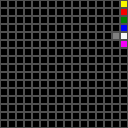
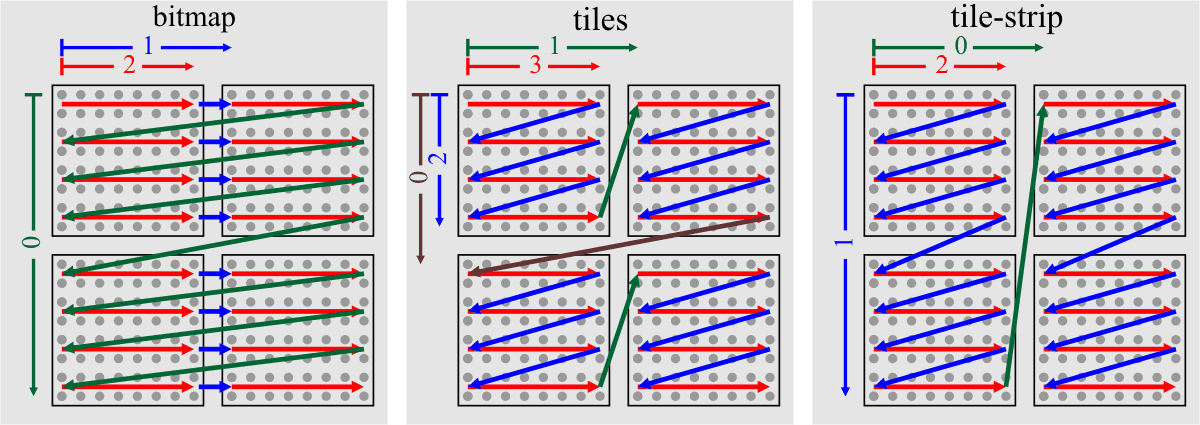

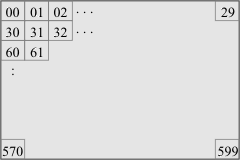 {*@fig:img-chr4-map}a. Row-major tile indexing.
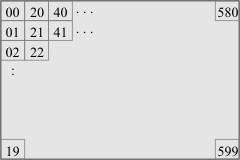 {*@fig:img-chr4-map}b. Column-major tile indexing.