| Hotkeys | ||
|---|---|---|
| Key(s): | Action: | Setting Name: |
| ALT + SHIFT + 1 | Activate in-game input configuration process for gamepad 1. | input_config1 |
| ALT + SHIFT + 2 | Activate in-game input configuration process for gamepad 2. | input_config2 |
| ALT + SHIFT + 3 | Activate in-game input configuration process for gamepad 3. | input_config3 |
| ALT + SHIFT + 4 | Activate in-game input configuration process for gamepad 4. | input_config4 |
| ALT + SHIFT + 5 | Activate in-game input configuration process for gamepad 5. | input_config5 |
| Virtual Gamepad 1 | |
|---|---|
| Key: | Button: |
| Keypad 2 | II |
| Keypad 3 | I |
| Enter/Return | Run |
| Tab | Select |
| W | Up |
| S | Down |
| A | Left |
| D | Right |
To prevent soft resets due to accidentally hitting RUN and SEL at the same time, set pce.disable_softreset to 1. This will prevent the emulated PCE from seeing both of those buttons pressed at the same time. However, it is not guaranteed to work on all games, particularly ones with sloppily-coded gamepad polling routines.
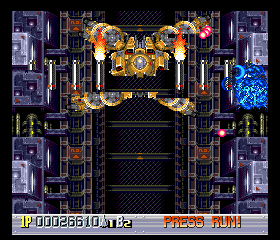
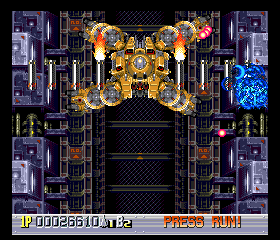
Sprite flickering in shmups got you down? Tired of scenery having a critical existence failure in games that have complex multi-layer effects? Then the pce.nospritelimit setting is for you!
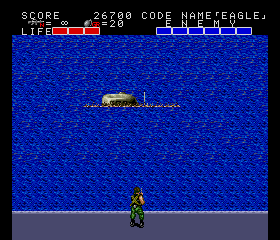
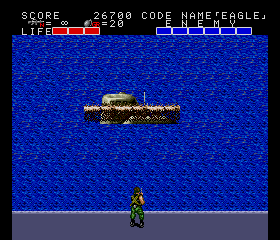
Changing this setting to a value of 1 will eliminate 99% of your flickering and existence failure woes. Side effects may include the superpower of seeing submarines through water(as in the first boss
scene of "Bloody Wolf"), along with seeing other hidden elements and graphical glitches("Ninja Ryukenden" has at least one broken cutscene with this setting enabled).
| Bloody Wolf (glitching example) | Ginga Fukei Densetsu Sapphire (improvement example) | ||
|---|---|---|---|
| | | |
| pce.nospritelimit 0 | pce.nospritelimit 1 | pce.nospritelimit 0 | pce.nospritelimit 1 |
Many CD games have awesome music, but it is drowned out by excessively loud obnoxious sound effects. This can be partially remedied by altering the pce.cdpsgvolume and pce.adpcmvolume settings, try say a value of 50, but doing so may cause issues with cutscenes and PSG music-only sections.